This is the Viewer environment for displaying data created with the tools and plug-ins provided by NintendoWare for CTR (hereafter, NintendoWare) on the CTR platform.
The Viewer environment comprises the following tools.
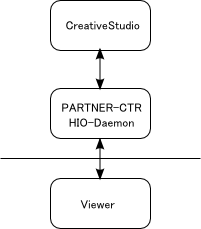
The Viewer environment has the following structure.
There are two ways to send data to the Viewer for previewing.
Data located in the reload file path given in the settings file can be loaded by pressing the reload button while PARTNER-CTR Debugger is running.
Note: Currently, binary files saved with CreativeStudio can be previewed.
Data being previewed under CreativeStudio can be converted to binary and loaded by selecting Transfer to viewer from the CreativeStudio menu while PARTNER-CTR Debugger is running.
Currently the operation of the Viewer has been confirmed with the following environments.
Development Devices
When using PARTNER-CTR Debugger, you must first install firmware compatible with the SDK being set up.
Operations were tested for the following connection methods between the development device and a PC.
Communication Environment
CONFIDENTIAL