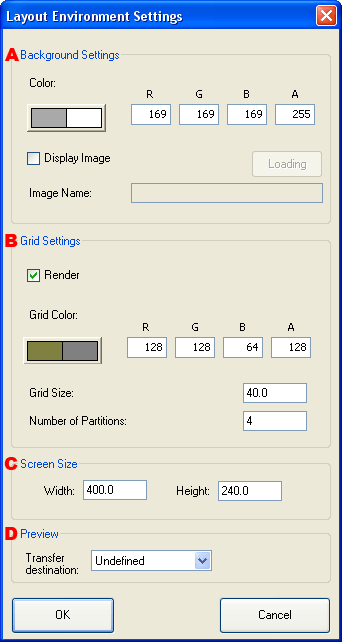
Layout Environment Settings Dialog Box

Makes environment settings for the Layout window.

Layout Environment Settings Dialog Box

  1. Sets the Layout window background.

    On-screen color
    Specifies the background color of the Layout window. The background color can be specified using the Color Picker Dialog Box.
    Display image

    Displays an image for the background of the Layout window. Only regular TGA files can be displayed.

    Actual game screens can be made into images and layouts by converting design screens or screenshots of game screens into TGA files and displaying them in the background.

  2. Makes settings regarding the drawing of grid lines.

    Draw
    Specifies whether to draw grid lines.
    On-screen color
    Specifies the grid line color. The grid line color can be specified using the Color Picker Dialog Box.
    Grid size
    Specifies the size of the grid.
    Number of divisions
    Specifies the number of divisions of the grid.
  3. Makes settings regarding the layout size.

    Width and height
    Specifies the width and height of screen display area of the layout.
  4. Specifies the data transfer destination screen when previewing.

    Undefined
    Transfers data based on the transfer destination setting of the Tool Environment Settings dialog.
    Top screen, Bottom Screen
    Transfers data to the screen configured for each set of layout data, regardless of the transfer destination setting of the Tool Environment Settings dialog.


CONFIDENTIAL