The TGA plug-in saves and loads Targa (TGA) files appended with additional information used for NintendoWare. The additional information includes format, number of mipmap levels, texture data, and it is reflected in the intermediate file when it is output from the 3DCG tool.
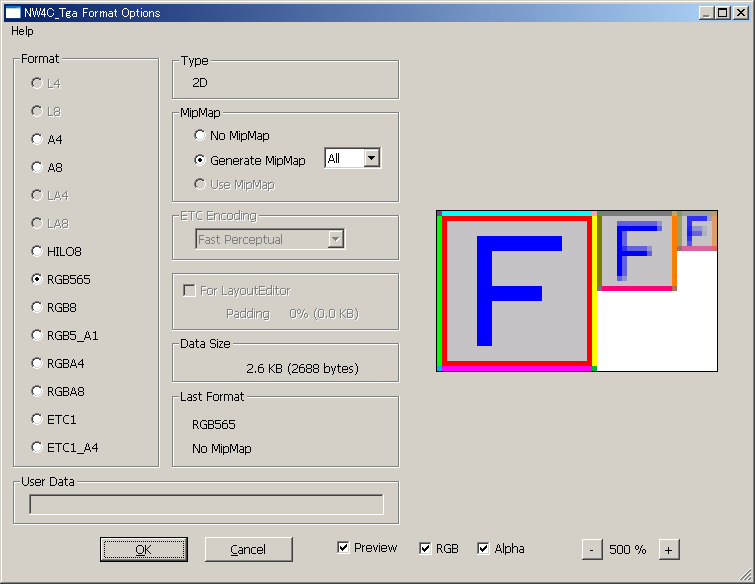
To save a TGA file that includes additional information for NintendoWare, select Save as... on the File menu and set the file format to NW4C_Tga. Clicking the Save button displays a dialog box.
2D is displayed if a 2D texture is set for Type and a Cube Map is displayed if cube map is set.
The amount of texel data saved under the selected format is displayed in Data Size.
The last format used when saving with NW4C_Tga is displayed for Last Format.
To save, set the desired options and click OK.
Specifies the current texture format.
The format appropriate for the given file type is selected by default.
However, once a file has been saved using NW4C_Tga, the format last used for saving will be selected if it is possible to save in that format.
In addition, if a color depth filter is applied, the format specified when the filter was applied will be selected. If an ETC filter is being applied, ETC1 or ETC1_A4 is selected.
The conditions under which each format can be selected are given below:
| Format Name | Conditions Allowing Selection |
| L4 L8 LA4 LA8 |
Always selectable if the image mode is grayscale. These can be selected the image mode is other than grayscale and the color used by the image is all R=G=B. |
| A4 A8 HILO8 RGB565 RGB5_A1 RGBA4 RGBA8 |
Always selectable. |
| RGB8 | Selectable as long as it is not a mipmap. |
| ETC1 | Selectable if the height and width are 16 or higher and an ETC filter is not being applied with alpha present. (In the case of a mipmap image, this is determined using the width and height of the smallest size level.) |
| ETC1_A4 | Selected if an ETC filter is not being applied in a state without alpha. |
Select No MipMap if not using mipmaps.
Select Generate MipMap and specify the number of levels, to automatically generate mipmap data and output it as additional information. If the number of levels is set to All, a mimpap up to the largest level for the image size is created. If the format is ETC1, a number of levels less than 16 cannot be selected for the width and height. Images are fixed using bilinear compression.
If a mipmap image is created using the Create Mipmap Plug-in, the Use MipMap option is automatically selected. (No MipMap and Generate MipMap cannot be selected.)
As long as the image has not been manually adjusted after applying the ETC filter, this option cannot be changed.
If the For LayoutEditor option is ON, Generate MipMap cannot be selected.
Specifies the compression method if the format is ETC1 or ETC1_A4.
As long as the image has not been manually adjusted after applying the ETC filter, this option cannot be changed.
Fast, Medium, and Slow indicate the calculation speed for compression. The slower the calculation speed, the better the image quality.
Methods that include Perceptual compress so the error is smallest for the green (G) component, which is the most easily detectable component by the human eye. We recommend a method that include Perceptual when dealing with normal map textures.
Regardless of the compression method selected, the amount of data after compression is the same.
Set this option to ON when saving TGA files for NW4C LayoutEditor.
If the width and height of the image are not powers of two equal to or greater than eight, turning this option ON, extends the pixel color at the right and left, and data for setting a size that is a power of two equal to or greater than eight is output as additional data.
The proportion of overall texture data in the expanded area (padding area) and the amount of texture data in the padding area are displayed below the option.
This option cannot be turned ON if the width and height of the image both have a size that is a power of two equal to or greater than eight, or if the image is a mipmap, or if no manual adjustments have been made to the image after applying an ETC filter.
This option cannot be turned OFF if the image width or height is not a power of two equal to or greater than eight and it is not the size of a cube map.
An error results when exporting intermediate files, if a TGA file for NW4C LayoutEditor is being used by the 3D CG tool.
TGA files saved with this option OFF can be used with NW4C LayoutEditor. However, cube maps cannot be used.
(Currently, unavailable.)
Inputs text string user data. User data can be used freely by any game. User data is not output if nothing is input.
Setting Preview on the dialog box to ON will display the preview image. The preview image can be used to check how a texture saved under current options will appear when displayed on the Revolution console. However, the image's picture quality in Photoshop will not change even if it is saved.
The RGB display and alpha display can be changed using the RGB and Alpha checkboxes. If both RGB and Alpha are ON, the display appears redder the closer alpha is to 0.
To zoom in or out on the preview image, click the [+] or [-] buttons or use the mouse wheel.
To load a TGA file that includes additional information for NintendoWare, select Open on the File menu, select a file, and click Open.
It is also possible to load TGA files by dragging and dropping them on the Photoshop window.
Files that have an image mode other than grayscale, index color, or RGB color, and files that use 16 bits per channel cannot be saved using NW4C_Tga.
Both the height and width of the texture image must be a power of two equal to or greater than 8 and equal to or less than 1024.
However, if the texture is used by NW4C LayoutEditor, it can be saved even under a different size if the For LayoutEditor option is set to ON. When creating a mipmap image with Photoshop, be sure to refer to the description of the Create Mipmap Plug-in. When using cube maps, refer to Creating Cube Maps.
When using the ETC1 format, the smaller of the vertical or horizontal dimensions must be 16 dots or greater.
If the image is a mipmap, the size of each mipmap level must meet this restriction.
The ETC1 format can be selected even if this restriction is not met, but a warning will be issued when the OK button is pressed and processing will not be executed.
If there are two or more alpha channels, only the alpha channel at the top of the list in the channel window is saved. Note that the next time data is loaded, data for the other alpha channels will be lost.
If the image mode is grayscale and the format is A8, the gray channel is saved as alpha if there is a background and no alpha channel.
The alpha of tranparent parts is saved as 0, if the image mode is index color, there is a transparent color in the color table, and there is no alpha channel.
In Photoshop, the brightness of alpha channel varies depending on the Color Setting. However, when NW4C_Tga is used, an 8-bit K value is saved as the alpha regardless of the color setting. (This value is 255 if K = 0%, 128 if K = 50%, and 0 if K = 100%. In Photoshop, K values are maintained as 8-bit values.)
Layer information cannot be saved using NW4C_Tga. If an image that has more than one layer is saved as TW4C_Tga, all layers will be combined the next time it is loaded.
For images with no background and for which only layers exist, the transparency of pixels when all layers are combined is saved as alpha if there is no alpha channel.
If a file is saved using NW4C_Tga and is later overwritten by selecting Save on the File menu, it will be saved in the same format as used at last save. If the same save format can be used, no dialog box is displayed.
If you want a dialog box to appear, select Save as... on the File menu.
The dialog box will be displayed even if Save was selected when it has become impossible to save in the same format as used at last save due to a change in the size of the image. Note that a format suitable for the file is selected at this time.
The picture quality available under Photoshop is maintained when data is saved in any format. For example, the color depth of the alpha channel is not forced to 4 bits, but rather maintained at 8 bits, even if an image file is saved in RGBA4 format.
If you want the same picture quality displayed under Photoshop as is displayed on the Wii console, use the Color Depth Filter Plug-in and the ETC Filter Plug-in.
Although the brightness of grayscale and alpha channel in Photoshop varies, for some Color Settings in Photoshop an 8-bit K value is saved as the intensity (alpha), regardless of the color setting used with NW4C_Tga. (This value is 255 if K = 0%, 128 if K = 50%, and 0 if K = 100%. In Photoshop, K values are maintained as 8-bit values.) Color settings are not saved in TGA files saved with NW4C_Tga.
If the color setting is set as given below, the brightness of grayscale and alpha channel in Photoshop is almost directly proportional to the K value.
(Show advanced options)
RGB: sRGB IEC61966-2.1
Gray: sGray
Dithering: OFF
CONFIDENTIAL