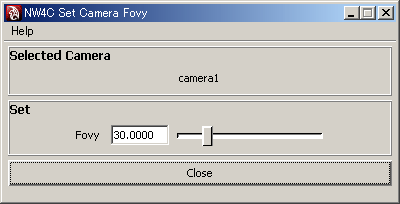
Configures the camera's angle of view in the vertical direction (Fovy).
The Angle of View displayed in the camera's Attribute Editor is from the horizontal direction, and is different from Fovy that is output to the intermediate file.
To reflect Fovy configured in CreativeStudio on Maya, use this plug-in.
From the NW4C menu, run NW4C Set Camera Fovy to display a window.
Selected camera transform nodes are displayed in the Selected Camera field. If four or more nodes are selected, display is skipped and the number of nodes selected is displayed on the right.
Setting Attributes
When the camera's transform node or the camera node is selected (multiple selections are possible), the current setting for the selected camera is displayed in the Set field. If multiple selections were made, the setting for the first selected camera displays.
Fovy is set by a number input or a slider.
You can make multiple selections and change all cameras at once.
A different camera can be set by selecting another node without closing the window.
Fovy is affected by the Vertical Film Aperture attribute of the camera node. Before configuring Fovy, make sure to configure the Vertical Film Aperture attribute.
CONFIDENTIAL