Mipmaps
This section describes the structure and characteristics of mipmaps.
Mipmap Structure
Mipmap is a feature where textures having lower resolution than the original texture are prepared ahead of time and the texture being used is changed based on distance.
To read details about the mipmaps, see here.
Creating a Mipmapped Texture
You must create a mipmapped texture from a square image whose dimensions are a power of 2.
For details about this power of 2 rule, click here.
The image below shows a four-level mipmapped texture created from a texture with a maximum size of 128x128 pixels.
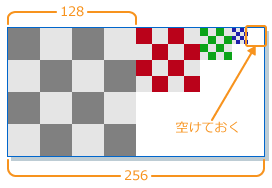
In this case, we create a texture that leaves the right-most unused portion empty, and specify the number of mipmap levels in the plug-in settings when outputting the texture data.
Use the Photoshop Plug-in to create the texture. For details on the Photoshop Plug-in, see the following documentation:
%NW4C_ROOT%/documents/DccPlugin/Photoshop/PhotoshopPlugin.html
Mipmap Characteristics
This section describes the characteristics of mipmaps.
Processor Load Reduction
When using mipmaps, textures are displayed on-screen at a resolution appropriate to the surface area being displayed. You can therefore reduce the load from processing texels, such as when applying a large texture to small screen area. That said, there is still a load incurred even when using mipmaps when the mipmap level filtering method is configured for smooth interpolation.
Moiré Reduction
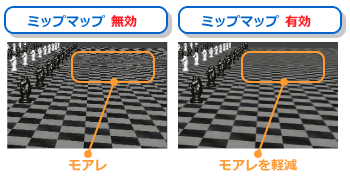
You can reduce visual artifacts caused by moiré patterns when using mipmaps.
Moiré patterns are interference patterns that occur when regular patterns are reduced in size.
Moiré patterns occur when a texture with relatively high resolution is mapped to an on-screen area with relatively low resolution, causing the texture not to fit neatly within a single pixel. This causes the texture to appear to flicker.
The figure below compares how moiré reduction affects the display of a mipmapped texture when displayed at smaller sizes.
Mipmap Level
Mipmapped textures have levels. Level 0 is the original image at the original size. Each successive level is then the preceding level image cut to half the length and width. The minimum resolution of a mipmap is the minimum size for each texture format.
The figure below shows an example of the relationship between mipmap level and resolution.
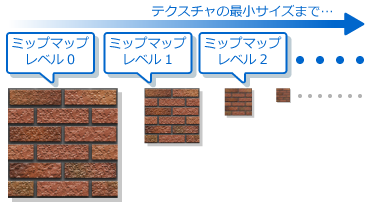
The mipmap level or resolution used is determined by the mipmap level of detail (LOD).
The term mipmap LOD level refers to the mipmap level that is applied to a mipmapped texture at runtime.
LOD bias
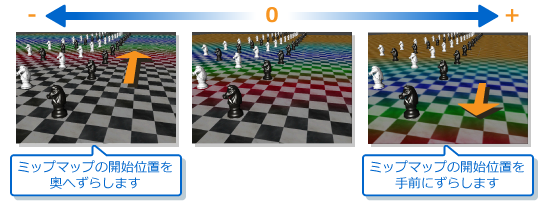
Mipmap LOD bias refers to a feature that adjusts the mipmap level that is applied by shifting the mipmap LOD level when the a level with something other than the desired resolution is referenced.
The figure below shows an example of changing the color of a texture for each mipmap level to better illustrate how levels work.