Shader Creation Panel
The Shader Creation panel is used to create shaders from user shader data and register them with the Contents Manager.
This panel can be opened by selecting Create > Expert > Shaders on the CreativeStudio menu.
This panel provides features intended for programmer's who create their own custom shaders.
For details on the Shader Creation panel, see the document "User Shaders" found in the nw::gfx namespace in the NintendoWare for CTR Function Reference Manual. The NintendoWare for CTR Function Reference Manual can be found in:
" %NW4C_ROOT%/documents/API/index.html "
Shader Creation Panel Settings and Features
This page describes Shader Creation panel settings and features.
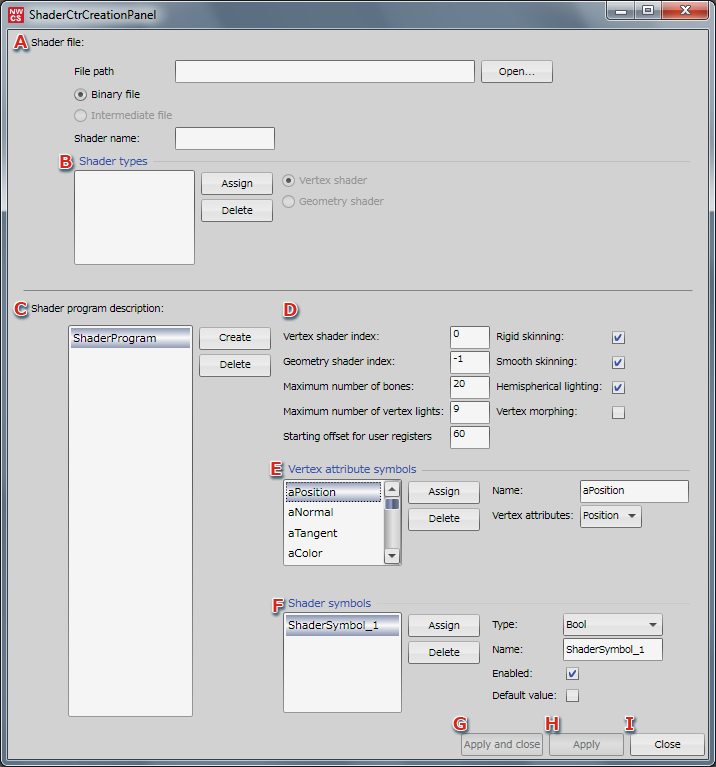
-
You can create a shader under any name.
Set the file type and file path to the shader file. -
Allows you to assign and delete the shader types to be added to Shader types.
-
Creates a shader program for which a parameter shader index, vertex attribute symbol and/or shader symbol has been configured.
Shader programs can also be deleted. -
Indicates the shader number used in the shader file.
-
Allows you to assign or delete vertex attribute symbols.
-
Allows you to set the type and name of a shader symbol and assign or delete them.
-
Apply and close
Registers the shader in the Contents Manager and closes the Shader Creation panel.
-
Apply
Registers the shader in the Contents Manager, but the Shader Creation panel remains open.
-
Close
Closes the Shader Creation panel without creating a shader.
Shader file
This section describes settings made under Shader file.
File Path
Enter the file path of the shader file.
The file path can also be selected from the Open dialog.
File Types
Select a shader file from binary files or intermediate files.
Only binary files are currently supported.
Shader name
Enter the name of the shader.
The name "Shader" will be used if nothing is entered.
Shader types
This section describes settings made under Shader types.
Shader Types
Selects the shader type to be assigned under Shader types.
Assign
Assigns the specified shader type as a type of shader.
The assigned shader type is added at the end of the list.
Delete
Deletes one shader type.
Deletions are made beginning from the bottom of the list.
Shader Programs
This section describes creating and deleting shader programs.
Create
Adds a shader program for which Shader index, Vertex attribute symbols and/or Shader symbols has been configured.
Additions are made to the bottom of the list.
Delete
Deletes one shader program.
Deletions are made beginning from the bottom of the list.
Shader index
A shader index is the shader number used in a shader file.
Vertex shader index
Specifies the shader index for a vertex shader.
Geometry shader index
Specifies the shader index for a geometry shader.
Specify -1 if a geometry shader is not used.
Maximum number of bones
Sets the maximum number of bones.
Maximum number of vertex lights
Sets the maximum number of vertex lights.
User register start offset
Sets the start offset of the user regsister.
Rigid skinning
Sets rigid skinning.
Smooth skinning
Sets smooth skinning.
Hemispherical lighting
Sets a hemispherical light.
Vertex morphing
Sets vertex morphing.
Vertex attribute symbols
Name
Specifies the vertex attribute name. The name "VertexAttributeSymbol_*" will be used if nothing is entered.
Vertex attributes
Sets vertex attributes by selecting from a pull-down menu.
Assign
Assigns the specified vertex attribute symbol to a parameter.
The assigned vertex attribute symbol is added at the end of the list.
Delete
Deletes one vertex attribute symbol.
Deletions are made beginning from the bottom of the list.
Shader symbols
This section describes settings made under Shader symbols.
Type
Allows you to set the type and name of the symbol to be added.
Name
Specifies the name of the shader symbol.
The name "ShaderSymbol_*" will be used if nothing is entered.
Enable
Allows you to enable mapping with shader parameters.
Default Value
Sets the default value applied to shader symbols.
Items to be entered vary depending on the selection made for Type.
Assign
Assigns the specified shader symbol under parameters.
The assigned shader symbol is added at the end of the list.
Delete
Deletes one shader symbol.
Deletions are made beginning from the bottom of the list.