Skeletal animation Properties panel
This panel is used to edit skeletal animation settings.
Skeletal Animation Properties Panel Settings and Features
This page describes the skeletal animation Properties panel settings and features.
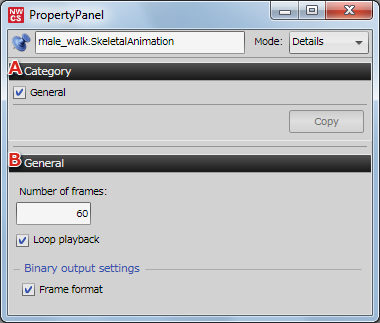
-
Category
Settings on the skeletal animation Properties panel can be copied.
Note that settings are not copied if the checkbox is not selected. -
General
You can set the number of frames and loop playback.
You can also set whether to convert into frames using binary output settings.
If you change the number of frames, be sure to also change the setting on the CreativeStudio timeline panel.
General
You can make the following three settings under General.
- Number of frames: Sets the number of frames for a skeletal animation.
- Loop playback: Select this checkbox to loop playback of a skeletal animation.
- Binary output settings: Select this checkbox to output frame format binary data.
Note on Binary Output Settings
The skeleton data in the .cmdl and .skla intermediate files must match when outputting a skeletal animation in frame format.
If they do not match, there may be a difference in behavior between standard binary output and frame format output.
For details on intermediate files, click here.
Differences in operations between frame format and standard format
This is a description of the difference between frame format binary output and standard format binary output.
Frame format
With frame format binary data, all frames include Scale, Rotate, and Transform settings.
Curve evaluation results are entered for components for which an animation is configured. A copy of the bind pose value in the .cskla file is inserted for components for which an animation is not configured.
All components are therefore written into the model every frame.
Standard format
A bind pose value is not included in standard format binary data.
Only components for which an animation is configured are written into models. Other components are not changed.
As a result, the bind pose value in the .cmdl file is used for components for which an animation is not configured.
Due to the above differences caused by each format when using binary output, behavior will not match if the bind pose differs between the model and the animation.
The reason that skeleton data is included in both is because this allows optimization and binary output using the .cskla file alone.