Shader Properties Panel
On the shader Properties panel, you can check details on shader programs loaded into CreativeStudio.
Shader Properties Panel Settings and Features
This page describes shader Properties panel settings and features.
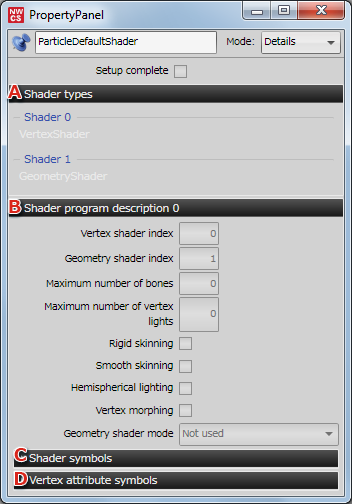
-
Shader types
Displays the types of shaders being used.
-
Shader program description
Displays information such as the shader index, vertex attribute symbol, and shader symbol set for the shader program.
-
Shader symbols
Shader symbol parameters can be displayed by opening the expander.
The shader symbol type and name are displayed.
You can also enable/disable shader symbols and change default values. -
Vertex attribute symbols
The vertex attribute symbol set for the shader program can be displayed by opening the expander.