toon_chess
toon_chess is a toon shader expression in anime style.
This type of expression is possible by drawing the RGB lookup table in a tiered pattern.
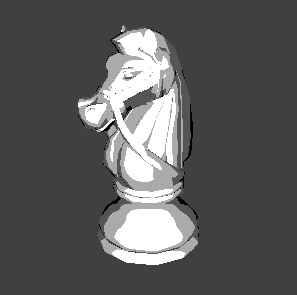
toon_chess Settings
This section describes settings for the toon_chess material sample.
Material Settings
This section describes material settings for toon_chess.
Click on toon_mat displayed on the CreativeStudio Contents panel to open the material Properties panel.
General
Check the entire material Properties panel.

The rendering setting is set to Fragment Lighting.
This indicates that fragment lights are rendered using a lookup table for toon_chess.
Rendering settings must be changed to match the light being used.
Color
Check the colors on the material Properties panel.
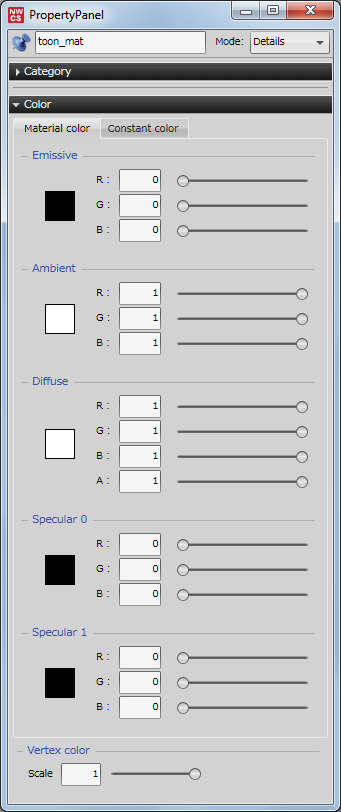
Colors are not set for toon_chess, because its specular colors are specified in the lookup table.
Fragment
Check the fragment lighting options on the material Properties panel.

The layer configuration of the fragment lighting for toon_chess is Configuration Type 0.
This setting enables Spot, Distribution 0 and Reflection (R) in the lookup table.
The Reflection (R) setting is grayscale because it is used for Reflection (G) and Reflection (B) as well.
For details on layer configurations, click here.
Lookup tables
Check the lookup table on the material Properties panel.
Lookup table set
LookupTableSetContentCtr0 is selected for the lookup table set.

The lookup table set manages created lookup tables as a set.
Clicking on LookupTableSetContentCtr0 displayed on the CreativeStudio Content panel displays the lookup table Properties panel, where you can check the lookup tables being managed.
Comp.
Next, check the lookup table list.
The setting for toon_chess has been made so that only a single reflectance setting is enabled and separate ones for reflectance_r, reflectance_g and reflectance_b are not used.

| Comp. | Lookup Tables |
|---|---|
| Reflection (R) | toon_reflectance |
The lookup tables set here are managed as a lookup table set.
For details on lookup tables, click here.
Input angle
Next, check the input angle, back in the Fragment tab of the materials Properties panel.
NH is used for toon_chess.

The input angle NH represents light that is affected by the light and viewpoint.
This is primarly used for specular expressions.
For details on the types of input angle, click here.
Fragment lighting
Check the fragment lighting on the material Properties panel.
With toon_chess, a check has been entered for Apply the factor for the reflection table.

This enables application of the factor when creating the colors of light to be reflected using a lookup table.
Texture combiners
Check the texture combiners on the material Properties panel.
This sets the colors of Combiner 0 for toon_chess.

| Setting | Settings |
|---|---|
| Formula | A |
| A: Source 0 | Secondary color |
This setting indicates that the secondary color will be used as-is.
The term "secondary color" indicates the specular color and lookup table.
The output result of the vertex shader is used for Source 1 and Source 2. However, there is no effect on the model because the result is not used by the calculation formula.
CurveEditor panel
Check the CurveEditor panel for the lookup tables actually used with toon_chess.
Select LookupTableSetContentCtr0 located on the Creative Studio Contents panel.
While in the state described, select Window > Curve editor... from the menu bar to open the CurveEditor panel.

- Horizontal axis: results in a change from 0 to 1 (from 90 degress to 0 degrees) using the angle created by input angle elements.
- Vertical axis represents color (light) intensity.
toon_reflectance settings
Select toon_reflectance displayed on the Curve Editor panel to check its curve.

This image expresses tiered, toon-like shadows using a tiered curve.